
Is your website underperforming? Web monitoring tools might be the missing link to unlock its full potential. In an age of digital immediacy, a swift and seamless user experience isn’t just a luxury—it’s an expectation. These powerful tools track critical aspects like uptime, performance, and security, ensuring your site remains operational and user-friendly. By understanding the significance of web monitoring tools and who typically employs them, businesses can position themselves for success. Prepare to explore how these solutions can significantly enhance website performance and protect against unforeseen downtime efficiently.
Understanding Web Monitoring Tools

Web monitoring tools are indispensable in ensuring the optimal performance, availability, and health of websites. These tools meticulously test various aspects of a website, such as uptime, performance, and functionality, to maintain operational efficiency and enhance user experience. By continuously analysing website metrics, they help identify potential issues before they impact the user, thus safeguarding the site’s reputation and functionality.
The primary users of web monitoring tools include IT professionals, webmasters, and business owners who seek to maintain high website standards. IT professionals utilise these tools to ensure server performance and application health, while business owners rely on them to ensure their website delivers a seamless user experience and supports business objectives. These tools provide the critical insights needed to make informed decisions that improve overall website performance.
Key aspects of web monitoring tools include:
- Uptime monitoring
- Performance tracking
- Security checks
- User experience analysis
- Functionality testing
By employing web monitoring tools, businesses can effectively prevent downtime and mitigate security risks. These tools offer real-time alerts and comprehensive reports, allowing teams to quickly address and resolve issues. This proactive approach not only minimises the risk of lost revenues due to outages but also protects sensitive data by identifying potential vulnerabilities early on.
Types of Web Monitoring Tools
Web monitoring tools are essential for maintaining optimal website performance and can be divided into several categories, each serving distinct purposes. These categories primarily include synthetic monitoring, real user monitoring (RUM), and middleware solutions. Each type offers unique capabilities, enabling businesses to gather comprehensive insights into their website’s functionality and user experience.
Synthetic monitoring involves simulating user interactions to evaluate website performance. By creating scripts that mimic user behaviours, synthetic monitoring tests various scenarios, helping to identify potential issues before users encounter them. This proactive approach allows for the detection of performance bottlenecks, downtime, and other critical issues, ensuring that websites remain operational and efficient.
Real user monitoring (RUM) focuses on analysing actual user interactions with a website in real-time. By collecting data from users as they navigate the site, RUM provides valuable insights into the user’s experience, highlighting areas where performance may be lacking. This method allows businesses to make informed decisions based on real-world usage patterns, enhancing the website’s overall functionality and user satisfaction.
Middleware solutions provide full-stack observability by combining both synthetic monitoring and RUM. These tools enable detailed analysis of complex applications, offering a holistic view of the website’s performance. Middleware ensures that businesses can monitor their entire digital ecosystem, from backend infrastructure to frontend user interfaces, facilitating seamless operations and rapid issue resolution.
| Type | Function |
| Synthetic Monitoring | Simulates user interactions to identify potential issues |
| Real User Monitoring | Analyses real-time user data for performance insights |
| Middleware Solutions | Combines synthetic and RUM for full-stack observability |
| Comprehensive Analysis | Offers holistic view and rapid issue resolution |
Evaluating the Best Web Monitoring Tools
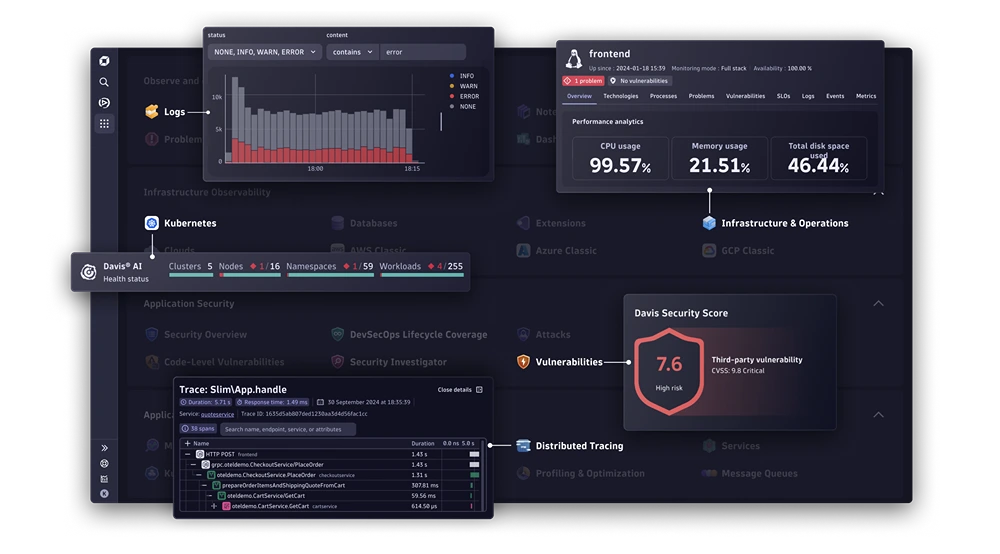
Evaluating web monitoring tools requires a thorough understanding of several key criteria, including features, user experience, and cost-effectiveness. Features such as real-time alerts, comprehensive reporting, and robust integrations are vital. User experience plays a significant role, as a tool with an intuitive interface can enhance productivity. Cost, too, is a determining factor, with prices varying significantly across different tools. Businesses must weigh these factors to select a tool that aligns with their operational needs and financial constraints.
Datadog is highly regarded for its real-time monitoring capabilities and extensive platform integrations. This tool provides users with dynamic dashboards that offer insights into infrastructure and application performance. Its ability to integrate widely with popular platforms makes it a versatile choice for diverse business environments. Furthermore, Datadog’s real-time monitoring ensures that any performance issues are promptly identified and addressed, maintaining optimal website functionality.
SolarWinds stands out in the realm of enterprise network monitoring. It excels in providing advanced alerting and SNMP device discovery, which are crucial for managing large networks. Its focus on network performance makes it an ideal choice for businesses requiring comprehensive monitoring solutions. The platform is designed to handle the complexities of enterprise-level networks, offering detailed insights that aid in troubleshooting and optimising performance across various network components.
Recommended web monitoring tools include:
- Dynatrace
- LogicMonitor
- Datadog
- Raygun
- Apica
Choosing the right web monitoring tool is essential for meeting specific business needs. Each tool offers unique features tailored to different operational requirements. Businesses need to assess their specific objectives, such as the scale of monitoring required and the level of integration needed. By carefully evaluating these factors, organisations can select a monitoring solution that not only fits their budget but also enhances their website’s performance and reliability.
Free vs. Paid Web Monitoring Tools
Free web monitoring tools offer a cost-effective solution for individuals and businesses seeking basic functionalities. They provide essential features such as monitoring uptime and basic performance metrics. These tools are particularly beneficial for small websites or startups with limited budgets, offering a no-cost entry point into website monitoring. However, the limitations of free tools become apparent when more comprehensive analysis is required. They often lack advanced functionalities like real-time alerts, detailed reporting, and robust integrations, which are critical for larger websites or businesses with complex needs.
Paid web monitoring tools, on the other hand, deliver a breadth of advanced features that elevate website monitoring to a professional standard. These tools support real-time alerts, allowing businesses to respond promptly to any issues. They also offer comprehensive performance metrics, detailed analytics, and the ability to integrate with various platforms. Additionally, paid tools often come with dedicated customer support, which can be invaluable for troubleshooting and optimising website performance. The cost of these tools can range significantly, from $10 to over $1000 per month, reflecting the level of functionality and support provided.
- Free tools offer basic uptime monitoring.
- Paid tools provide real-time alerts.
- Free tools lack detailed analytics.
- Paid tools include comprehensive reporting.
- Free tools have limited integration options.
When deciding between free and paid web monitoring tools, one must consider their specific budget and needs. Free tools may suffice for smaller operations with straightforward monitoring requirements. However, businesses with larger, more complex websites may find the investment in paid tools worthwhile, given the enhanced features and support. Evaluating the specific needs of a business, such as the desired depth of monitoring and available budget, will guide the selection process and ensure the chosen tool effectively supports operational goals.
How to Select the Right Web Monitoring Tool
Selecting the appropriate web monitoring tool is crucial for aligning with specific business objectives. The success of a website largely depends on the tool’s ability to monitor performance and address issues efficiently. By ensuring the tool meets the business’s operational goals, companies can enhance website reliability and user satisfaction. It is essential to consider various factors, including the scale of monitoring required and the level of integration with existing systems, to ensure seamless operation and optimal performance.
- Assess your monitoring needs: Identify the specific aspects of your website that require monitoring, such as uptime, security, or user experience.
- Determine your budget: Establish how much you are willing to invest in a web monitoring tool, keeping in mind the potential return on investment.
- Evaluate feature requirements: Consider which features are essential for your operations, such as real-time alerts, comprehensive reporting, or integrations.
- Consider user-friendliness: Choose a tool with an intuitive interface that facilitates easy navigation and quick access to data insights.
- Check for geographic scope: Ensure the tool can monitor performance globally, especially if your audience is international.
User-friendliness plays a pivotal role in the selection process, ensuring that the monitoring tool can be effectively utilised by all team members. An intuitive interface not only enhances productivity but also reduces the time required for training. Furthermore, the ability to perform global performance monitoring is vital for businesses with an international presence, as it ensures consistent user experience across different geographic locations.
For those seeking expert guidance in SEO and web monitoring tool selection, Smarter Digital Marketing offers invaluable assistance. Their expertise in digital marketing strategies can help businesses optimise their web monitoring processes and enhance website performance. By leveraging professional insights, organisations can make informed decisions that align with their strategic objectives, ultimately driving growth and success.

Final Words
Web monitoring tools play a crucial role in maintaining website health and performance.
They cater to a range of users, including IT professionals and business owners, focusing on uptime, performance, security, user experience, and functionality.
Different types, like synthetic and real-time monitoring, offer tailored solutions, while top providers demonstrate varied strengths.
Evaluating tools based on specific business needs and weighing features against budgetary constraints aids in selecting the most suitable option.
Leveraging the right web monitoring tool enhances operational efficiency, ensuring a robust online presence.
FAQ
What is the best website monitoring tool?
A: The best website monitoring tool varies based on needs. Popular options include Datadog for real-time dashboards and SolarWinds for network monitoring. Each tool offers distinct advantages for different monitoring requirements.
What is web monitoring software?
A: Web monitoring software tracks website performance, availability, and security. It identifies issues such as downtime and slow load times, enhancing user experience and operational efficiency.
How can I monitor a website for free?
A: Free website monitoring tools like UptimeRobot offer basic functionalities, including checking uptime and performance. They help maintain site responsiveness without incurring costs.
What are the benefits of using web monitoring tools?
A: Web monitoring tools offer benefits like uptime assurance, performance optimisation, security enhancement, improved user experience, and functional accuracy. These features help prevent downtime and security breaches.
What is synthetic web monitoring?
A: Synthetic web monitoring simulates user interactions with a website to identify potential issues. It helps ensure the site functions properly under various conditions, enhancing reliability.
How does real user monitoring work?
A: Real User Monitoring (RUM) captures actual user interactions to analyse real-time data. It provides insights into performance from a user’s perspective, facilitating targeted improvements.
What factors should one consider when selecting a web monitoring tool?
A: Consider monitoring type, user-friendliness, feature set, budget, and geographic scope. Align the selection with business objectives and prioritise essential features.
What are the key differences between free and paid web monitoring tools?
A: Free tools offer basic functions, while paid solutions provide advanced features like real-time alerts and detailed metrics. Paid options often include superior support and scalability.
For professional support with this, see our PPC management.
For agency support with this, see our about Smarter Digital Marketing and web design services.
