
Struggling with sluggish webpage load times and subpar user experiences? Optimising your website can be a daunting task, but Google Lighthouse offers a comprehensive solution. This powerful, free tool, seamlessly integrated into the Chrome browser, analyses key aspects of your website’s performance. From SEO to accessibility and best practices, Lighthouse audits provide actionable insights to significantly enhance your site’s efficiency. By understanding and leveraging these insights, web developers can boost website performance easily and efficiently. So, how can you utilise Google Lighthouse to its full potential? Read on to find out.
Understanding Google Lighthouse
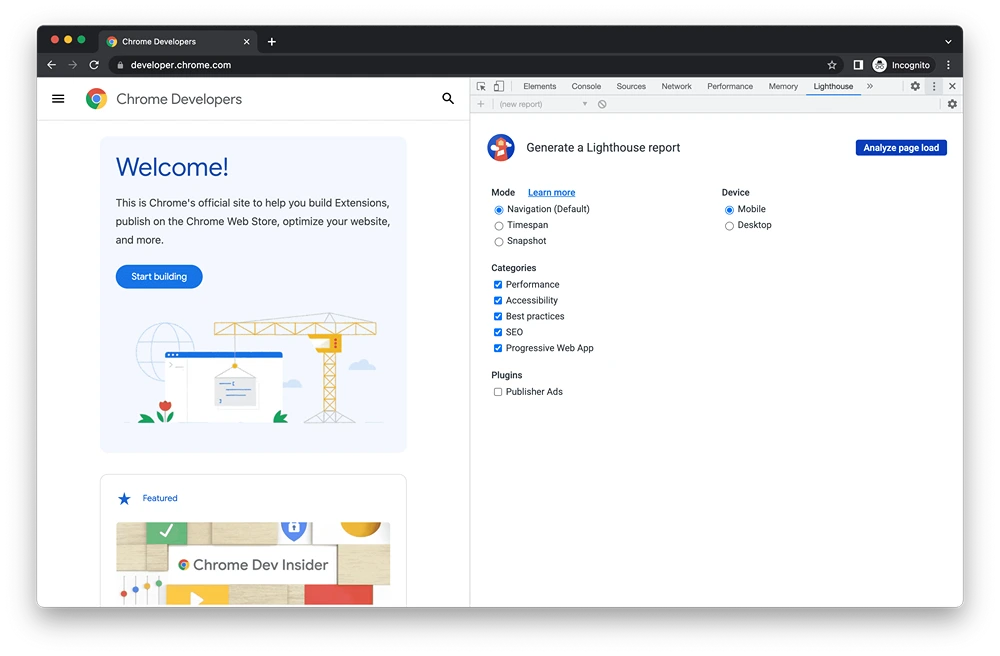
Google Lighthouse is a free tool powerfully integrated into the Chrome browser, designed to enhance website and web application performance, accessibility, best practices, and SEO. It operates by conducting comprehensive audits across various dimensions of a website, offering actionable insights and recommendations that assist in optimising overall user experience. As a versatile tool, Lighthouse can be accessed directly through Chrome, both as a built-in feature and as a standalone tool, ensuring flexibility for web developers looking to refine their digital presence.
- Performance
- Accessibility
- Best Practices
- SEO
- Progressive Web App
For web developers, Google Lighthouse serves as an invaluable resource, providing detailed feedback that can be used to improve both technical and visual aspects of a website. By identifying areas that require enhancement, developers can use Lighthouse to ensure their websites not only meet but exceed industry standards, leading to improved user satisfaction and potentially higher search engine rankings.
How to Use Google Lighthouse for Website Audits
Google Lighthouse can be accessed through several platforms, each offering unique features to accommodate different auditing needs. Users can run a Google Lighthouse test via Chrome DevTools, which integrates the tool directly into the browser for seamless analysis. Additional access points include the Chrome extension, which allows for quick audits, Google’s PageSpeed Insights for a more user-friendly interface, and a Node JavaScript module that supports advanced scripting and automation. This versatility ensures that web developers and site managers can perform comprehensive audits from their preferred platform, enhancing the efficiency of their optimisation efforts.
To utilise Google Lighthouse through Chrome DevTools, begin by opening Chrome and navigating to the webpage you wish to audit. Press Option + Command + I on Mac or Ctrl + Shift + I on Windows to open Developer Tools. Once in DevTools, locate the Lighthouse tab. Here, you can select the categories you want to audit—such as Performance, Accessibility, or SEO—and then click the ‘Generate Report’ button. This process initiates a series of tests that examine the chosen aspects of the website, culminating in a detailed report with actionable insights.
Running Lighthouse Tests
- Install the Chrome Lighthouse extension from the Chrome Web Store.
- Navigate to the webpage you wish to test.
- Click on the Lighthouse extension icon in the toolbar.
- Select the audit categories you wish to include.
- Click ‘Generate report’ to begin the analysis.
Using Google’s PageSpeed Insights to run Lighthouse tests offers additional benefits, particularly in terms of interpreting real user data. Unlike the lab data used by standalone Lighthouse audits, PageSpeed Insights incorporates field data to provide a more holistic view of user experiences. This approach allows developers to understand how their websites perform in real-world scenarios, offering a clearer picture of areas needing improvement. The insights gained from PageSpeed Insights are invaluable for prioritising enhancements that will most significantly impact user satisfaction and site performance.
Exploring the Key Metrics in Google Lighthouse Reports
Understanding Google Lighthouse scores is crucial for web developers aiming to optimise their websites. These scores provide a comprehensive evaluation of a website’s performance, accessibility, best practices, and SEO, offering insights into areas that require improvement. By analysing these metrics, developers can ensure their websites are not only fast and user-friendly but also adhere to industry standards for best practices and search engine optimisation.
Performance metrics are a critical component of Lighthouse reports. They include First Contentful Paint (FCP), Largest Contentful Paint (LCP), Total Blocking Time (TBT), Cumulative Layout Shift (CLS), and Speed Index. FCP measures the time it takes for the first piece of content to appear on the screen, providing an initial impression of load speed. LCP evaluates the time taken to display the largest visible content, which affects perceived load time. TBT assesses the time the browser is blocked from responding to user input due to JavaScript execution, impacting interactivity. CLS tracks visual stability by measuring content shift during loading, ensuring a smooth user experience. Speed Index calculates how quickly content appears visually complete, influencing user satisfaction.
Accessibility and SEO metrics are equally important for enhancing a website’s usability and visibility. Accessibility ensures websites are usable by individuals with disabilities, focusing on elements like colour contrast, keyboard navigation, and screen reader compatibility. SEO metrics evaluate factors such as meta descriptions, header tags, and content structure, ensuring that the website is easily crawlable by search engines and optimised for higher rankings. These metrics collectively ensure that a website is both accessible to a broader audience and visible in search engine results.
| Metric | Impact on User Experience |
| First Contentful Paint | Initial load impression; affects perceived speed |
| Largest Contentful Paint | Load time for largest element; impacts user experience |
| Total Blocking Time | Interactivity; influences responsiveness |
| Cumulative Layout Shift | Visual stability; ensures smooth content rendering |
| Speed Index | Perceived load completeness; affects user satisfaction |
By focusing on these metrics, developers can optimise their websites, enhancing both technical performance and user satisfaction.
Improving SEO and Performance with Google Lighthouse
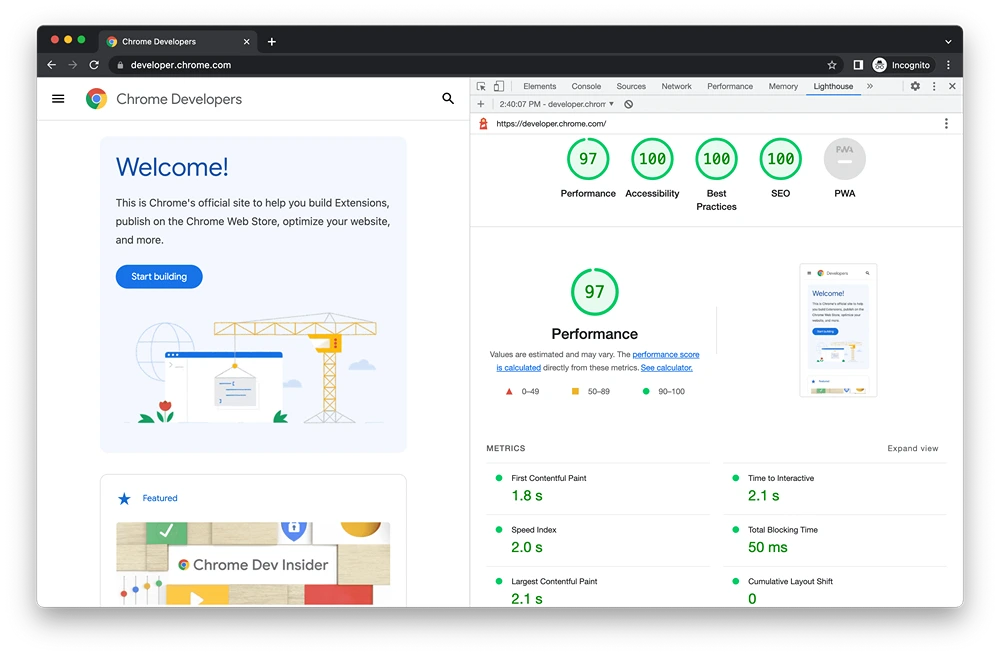
Google Lighthouse serves as a comprehensive SEO tool, adept at identifying and addressing issues that hinder a website’s search engine visibility. This involves evaluating critical elements such as meta descriptions, header tags, and overall content structure. By scrutinising these components, Lighthouse audits reveal areas where SEO can be enhanced, ensuring web pages are optimally structured for search engines. The precision of Lighthouse lies in its ability to pinpoint specific SEO deficiencies, allowing developers to make targeted improvements that can lead to increased organic traffic and better rankings.
Beyond SEO, Lighthouse also plays a pivotal role in enhancing overall website performance. Its audits provide actionable insights that are crucial for reducing load times and improving user interaction. Recommendations from Lighthouse might include optimising images, minifying CSS and JavaScript, or leveraging browser caching. These suggestions are designed to streamline the website’s operation, ensuring it loads quickly and functions smoothly, which is essential for maintaining a positive user experience. By implementing these changes, websites can achieve faster load times, leading to lower bounce rates and higher user engagement.
For those looking to maximise the benefits of Google Lighthouse, partnering with Smarter Digital Marketing can be highly advantageous. Their expertise lies in leveraging Lighthouse-driven insights to optimise websites efficiently. By focusing on both SEO and performance enhancements, Smarter Digital Marketing ensures that websites are not only discoverable by search engines but also deliver a seamless user experience. This dual approach not only boosts search engine rankings but also enhances user satisfaction, making it a strategic choice for businesses aiming for comprehensive digital optimisation.
Troubleshooting and Best Practices for Google Lighthouse
Variations in Google Lighthouse scores can be attributed to a range of factors, primarily network conditions and server response times. When users inquire, “Why do Lighthouse scores differ?” the precise answer is that fluctuations arise due to changes in these underlying conditions during each test run. For a more accurate interpretation of results, it is crucial to identify and control these variables. By understanding that network congestion or server load impacts performance metrics, developers can better contextualise score variations and focus on consistent testing environments to mitigate discrepancies.
- Run tests in incognito mode to avoid browser extensions affecting results.
- Close unnecessary applications to free up system resources.
- Clear browser caches to ensure fresh data is used during audits.
- Use a stable internet connection to minimise network variability.
- Conduct tests at different times to account for server load fluctuations.
Adhering to these best practices enhances the reliability of Lighthouse audits. It is essential to maintain a consistent testing environment to ensure that the results are accurate reflections of website performance. By standardising these conditions, developers can make informed decisions and implement effective improvements based on dependable data, ultimately optimising the user experience.
Accessing Google Lighthouse Resources and Documentation
Google’s web.dev site is a treasure trove of resources for those looking to enhance their understanding of Google Lighthouse and web performance. It provides comprehensive tutorials and guides designed to improve website performance metrics and usability. Users can explore a wide array of topics, from basic performance audits to advanced SEO strategies, ensuring that developers at all levels can leverage these insights to optimise their web presence effectively.
To download and integrate Google Lighthouse with Chrome, users have several options. For advanced usage, Lighthouse can be installed via Node.js by executing the command npm install lighthouse -g, which facilitates automated testing and script integration. Alternatively, the Chrome extension offers a more accessible route, allowing users to perform audits directly within the browser. Both methods provide powerful tools for enhancing website audits and improving digital strategies.

Final Words
Utilising Google Lighthouse is pivotal for enhancing web performance, accessibility, and SEO. This tool, integrated with Chrome, audits websites in distinct categories, providing insights for optimisation.
Website owners can conduct audits through multiple platforms, including DevTools and PageSpeed Insights, ensuring comprehensive analysis. Evaluating Lighthouse performance reports sheds light on critical metrics affecting user experience and SEO.
Implementing Google Lighthouse’s recommendations can significantly improve website speed and visibility. Accurate and consistent audits, supported by extensive documentation, ensure effective optimisation strategies.
Embracing the functionality of Google Lighthouse propels digital marketing success. The expertise available can unlock a website’s potential and boost overall performance.
FAQ
What is Google Lighthouse used for?
A: Google Lighthouse is used to analyse website performance, accessibility, best practices, and SEO. It offers insights and recommendations for optimising website functionality and improving user experience.
Is Lighthouse owned by Google?
A: Yes, Lighthouse is owned by Google. It is a free, open-source tool integrated into the Chrome browser, providing website audits and performance evaluations.
How much does Google Lighthouse cost?
A: Google Lighthouse is completely free to use. It is integrated into Chrome DevTools and can also be accessed as a standalone tool or Chrome extension without any cost.
Is Google Lighthouse any good?
A: Google Lighthouse is considered highly effective. It offers in-depth performance analysis and actionable recommendations, assisting developers in enhancing website speed, usability, and search engine optimisation.
What platforms can Google Lighthouse be used on?
A: Google Lighthouse can be accessed via Chrome DevTools, as a Chrome extension, through Google’s PageSpeed Insights, or using a Node JavaScript module. These options provide flexibility for users conducting audits.
For professional support with this, see our PPC management.
For agency support with this, see our local SEO across Scotland and the UK and about Smarter Digital Marketing.
